
In the database world, ensuring consistency and integrity of information is a priority. One of the most useful tools for automating tasks and maintaining data consistency is the triggers. We explain what triggers are, what they are used for, the different types that exist and how they can improve the management and security of a database.
What are triggers?
The triggers (or triggers) are blocks of code that are automatically executed in response to specific events in a database table or view. These events are typically modification operations such as INSERT, UPDATE o DELETE.
When one of these events occurs, the trigger is “fired» to execute a series of pre-defined actions. For example, it could be created to update an audit table when a new record is inserted into a main table.
Triggers act as «watchdogs» that automatically monitor and respond to changes in data, without the need for manual intervention.
What are triggers used for in databases?
Triggers have many practical applications, among them:
- Task automation, such as calculations, cascading updates or audits.
- Maintaining data integrity.
- Change control to keep a record.
- Data validation before they are inserted or updated.
- Notifications: trigger external alerts or processes in more complex systems.
What types of triggers exist in databases?
Triggers can be classified into different types, depending on when they are executed and the event that triggers them:
- Depending on the moment:
- BEFORE: are executed before the operation (INSERT, UPDATE, DELETE) is performed.
- AFTER: are triggered after the operation has been successfully completed.
- Depending on the event that triggers them:
- INSERT TRIGGER: is activated when a new record is inserted.
- UPDATE TRIGGER: when the data is updated.
- DELETE TRIGGER: for records.
- Other specific types (system dependent): Some databases, such as PostgreSQL, allow you to INSTEAD OF triggers, which replace the standard operation with a set of defined instructions.
Guide to using triggers in databases
Implementing triggers requires following some basic steps to ensure that their use is efficient and safe:
- Define the purpose: clearly identify the task to be performed by the trigger.
- Choose the type of trigger: determine whether it should be implemented BEFORE o AFTER and what the triggering event will be.
- Write the trigger code: use the language of the database system (PL/SQL for Oracle, T-SQL for SQL Server, etc.) to define the trigger actions.
- Test the trigger: ensure that it works correctly and does not introduce performance problems.
- Documenting: explain its purpose, functioning and any related dependencies.
Basic example in SQL:
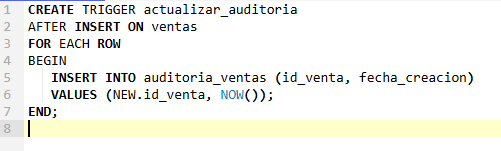
In this example, the trigger update audit is executed after a new record is inserted in the sales table to add audit information to the sales_audit table.
How to improve the integrity of triggers in databases
Although triggers are powerful tools, their misuse can negatively affect data integrity or performance. Some tips for optimising their use are:
- Keep triggers simple and specific.
- Design independent triggers to avoid errors due to dependencies between tables.
- Implement mechanisms that prevent a trigger from calling itself indefinitely.
- Proper documentation.
- Ensure that the trigger works correctly in different scenarios.
Differences between BEFORE and AFTER
The main differences between triggers BEFORE y AFTER are:
- BEFORE, as the name suggests, is triggered before statements are executed. AFTER is triggered afterwards.
- BEFORE is used to verify data before release. Once AFTER is used, it can no longer be modified.
- BEFORE is used for error prevention, AFTER for audits and cascade actions.
For example, a BEFORE trigger could correct incorrect data formatting before it is inserted into the table, while a AFTER trigger could record such an insertion in an audit table.
Triggers are a great ally for managing integrity and automation in databases. But, like any tool, they require proper and responsible use. With good practices and proper planning, they can be a key part of any data management strategy.




 Español
  English (UK)