
A form It is one of the most widely used and important tools in web development, as it allows collect and submit data from users so that they can be processed on a server.
The interaction between HTML y PHP in forms is necessary to handle the data submitted by users. HTML creates the structure of the form, whilst PHP processes and handles that data on the server.
Furthermore, the forms are highly customisable, as they allow you to adapt their design and functionality to the specific needs of the system or the user, using CSS styles to blend in with the site’s design.
One of the main advantages of using it is its ability to validate data. Another major advantage is its ability to facilitate interactive communication between the user and the application, whether for searches, registrations, comments or purchases.
In this article, we’re going to look at how to work with a form in PHP (form in PHP), from its basic structure, the elements that can be included, and how to validate the data submitted.
GET and POST methods
The HTML forms send data to the server using the GET or POST methods. In PHP, we can identify the method used by means of $_SERVER[‘REQUEST_METHOD’], which tells us whether the request is a POST or a GET.
GET method
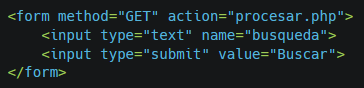
The GET method sends the data as a query string in the URL. This means that the data is visible for the user, as they are displayed directly in the browser.
It is useful for forms that do not handle confidential information, such as search forms or content filters.
The main advantages are that the data is easily accessible and can be shared via a URL, which is useful for quick consultations or tests.
However, there is a data limit which can be sent (depending on the browser) and, furthermore, as the data is visible, this means less secure this method for sensitive information.
A basic example of this method:
POST method
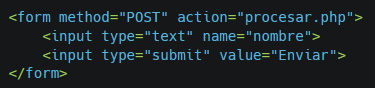
The POST method sends the data more securely by including it in the HTTP request body, not in the URL. This makes it ideal for forms containing sensitive information, such as credentials or personal details.
In this case there is no limit practical in terms of the amount of data sent and is safer than the GET method because the data is not shown in the URL.
However, as no data is included in the URL, The data cannot be shared or saved directly.
The code for the same form shown above, but using the POST method, would be:
Types of elements in a form
Input elements (input) in an HTML form allow you to interact with the user. PHP can collect this data using superglobal variables such as $_POST and $_GET.
Some of the key elements which can be included in a form are:
Text fields (text)
The text fields (text) These are the most common and allow users to enter text. They are used to capture names, addresses or any alphanumeric input.
Example:

In PHP, the value entered can be captured using:

Password fields
The password fields hide the user’s input by replacing it with asterisks or full stops, making them ideal for passwords or other confidential information.
And to capture the value in PHP:

Radio button (radio) and checkbox
The elements Radio buttons (radio) allow you to select a single option from several available choices. In contrast, the elements Checkbox (checkbox) allow you to select multiple options.
An example of how it might be used is as follows:

And the PHP code to retrieve the values:

Drop-down list (select)
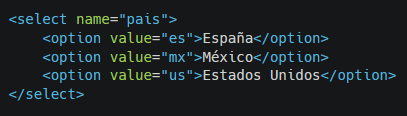
An element select enables users to choose an option of those included within a drop-down list.
Example:
In PHP:

Its main purpose is to select a value from a number of options within a compact space.
Text area (Textarea)
The element Text area enables users to writing text across multiple lines. It is useful for comments or descriptions.
Example:

In PHP:

Its main use is to collect lengthy content, such as messages or descriptive text.
Buttons
The element button can be used for customised actions. This element may contain HTML tags.
Example:

Custom-designed buttons or specific actions are usually implemented using JavaScript.
Date and time fields (date – time – datetime-local)
The fields of date and time They allow users to select dates, times or both, in an easy and visual way. They are ideal for planning or diaries.
There are several types of formats available:
Date:

Time:

Combined date and time (datetime-local):

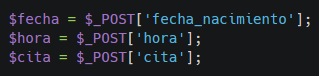
And, to retrieve the information in PHP:
Range
This input from range allows select a value from a range using a slider.
Example:

In PHP:
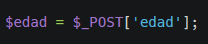
Its main use is to set values within a range, such as volume, age or percentage.
Colour
This form element Colour allows select a colour specifically through the use of a graphical user interface.
Example:

In PHP:

It is normally used for custom designs, selecting colour palettes or colour preferences.
Number
This field of numbers (number) allows you to enter only numerical values, with the option to set minimum and maximum ranges.
Example:

In PHP:

It is used to capture specific quantities, ages or numerical values.
Telephone (tel)
The element telephone (tel) is a field optimised for enter telephone numbers. It does not automatically validate the format, but it can be improved using patterns.
Example:

In PHP:

URL
The field of URL validates that the user enters a valid web address.
Example:

In PHP:

It is normally used to capture URLs for websites or online resources.
The field of email allows you to capture email addresses and validates them automatically.
Example:

In PHP:

It is used to collect email addresses with basic validation built in.
Reset buttons
This type of reset button allows you to reset all the fields in the form to their default values.
Example:

It is used to quickly clear a form.
Search fields
The search field element is optimised for search forms, although functionally it is similar to a text field. It is used to search for specific terms within the form.
Example:

Files (file)
The field of files allows you to select and upload files to the server.
Example:

And, if you wish to upload multiple files:

Hidden
The fields hidden transmit data to the server without showing them to the user.
Example:

Its main purpose is to send additional data, such as security tokens or user identifiers.
Submit buttons
All the fields included in a form are submitted via a submit button. The attribute type=»submit» is essential for processing forms:

Image as a submit button (image)
You can also use the image as a submit button (image), which uses an image as an interactive button to submit the form.
Example:

All these elements provide flexibility and adaptability when creating interactive and functional forms for any web application.
Data validation
Before processing form data in PHP, it is essential to validate them. This ensures that the data is secure and in the correct format.
Why validate data?
- Security: prevents the injection of malicious code.
- Accuracy: confirms that the information is correct and complete.
- User experience: allows you to spot errors before submitting the form.
Basic validation
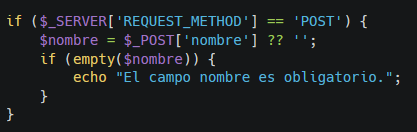
To carry out a basic validation In PHP, you can check that the values are introduced fillings as shown in the following example:
Validation using filters
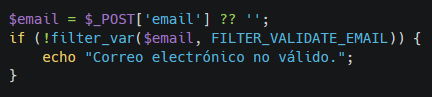
PHP also includes functions such as filter_var to validate email addresses, URLs and other fields that typically need to be validated. Here is an example in the following code:
Prevent code injections
Another key consideration when validating form data is to try to avoid falling victim to code injections. The well-known attack is usually employed SQL Injection which involves inserting SQL queries into a form field to exploit vulnerabilities in queries to the specified databases.
To try to prevent these code injections, you can use, for example, htmlspecialchars to prevent the execution of HTML code.
This allows user input in the form to be sanitised. For example:

Validation checks when uploading files
It is also important to file type validation which users can upload into the specific fields provided for this purpose within the form.
To do this, there are 2 techniques fundamental. On the one hand, there is the issue of check the file type sent, allowing only those that are desired and thereby preventing malicious files from being sent. For example:

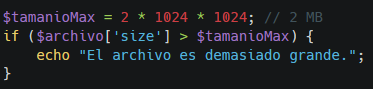
Furthermore, it is a good idea to limit the maximum size of files uploaded via the form to avoid problems. For example:
Forms in PHP, secure data entry
Working with forms is essential for any dynamic application or website. From data capture to advanced file management, the combination of PHP and HTML provide the foundations for building interactive and secure applications.
And remember, it is essential always to validate input to ensure the security of any application.





 Español
  English (UK)
  Français