
The batch process, also known as batch processing o batch processing, is a methodology used in computing to run a series of tasks or programmes automatically, without user intervention.
This type of processing groups multiple tasks into batches, which run sequentially or simultaneously, optimising system resources and enabling large-scale operations to be carried out efficiently.
Characteristics of batch processing
Batch processing is characterised by the following features:
-
Automation: Once configured, the batch process runs without the need for human supervision.
-
Efficiency: Large volumes of data can be processed within a given time frame by optimising the use of resources.
-
Scheduled execution: Batch processes are usually run at times when system demand is low, such as at night or at weekends.
-
Reducing human error: As it is automated, batch processing reduces the likelihood of human error.
-
Sequential or parallel processing: Depending on the configuration, batches may run one after the other or simultaneously.
Examples of batch processes
There are numerous examples of batch processing in various fields, including the following:
-
Payroll processing: to automatically calculate employees’ salaries, deductions and taxes at the end of each month.
-
Database backups: Many organisations schedule database backups for the night-time to avoid affecting operational performance.
-
Invoice processing: enable the automatic generation and dispatch of thousands of invoices to customers.
-
Big Data analysis: Companies that handle large volumes of data, such as social media and e-commerce platforms, use batch processing to analyse user behaviour patterns.
-
Bank transaction processing: to reconcile transactions and generate daily or monthly reports.
Advantages of batch processing
The use of batch processes offers a number of benefits, such as:
-
Cost reduction: Automating repetitive tasks minimises the time and resources required.
-
Scalability: It enables large amounts of data to be processed without the need for manual intervention.
-
Reliability: As these are pre-configured processes, the consistency and accuracy of the results are guaranteed.
Practical application
To understand how a batch process works, the steps involved in the following practical exercise demonstrate its potential:
-
Creating a batch processing script:
-
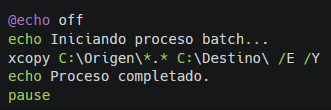
On Windows systems, you can create a .bat file with the following content:
-
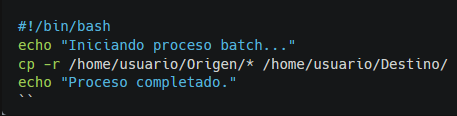
On Linux systems, you can create a .sh script with the following content:
-
Running the script: Save the file with the correct file extension and run it to see how it copies the files automatically.
-
Process automation: schedule the script to run using the Task Scheduler on Windows or cron jobs on Linux so that it runs at a specific time.
In short, the batch processing It is an efficient solution for carrying out repetitive or high-volume tasks without the need for constant supervision.
The proper implementation of batch processes enables companies to improve their productivity and ensure a consistent and reliable workflow.



 Español
  English (UK)