
The hexadecimal system, also known as base 16 or simply hex, is a number system that uses 16 different symbols to represent numerical values. In the hexadecimal system, the digits 0 to 9 are used to represent the first 10 values, and the letters A, B, C, D, E and F (or a, b, c, d, e, f) are used to represent the values 10 to 15, respectively.
The hexadecimal system is widely used in computer science y programme because of its close relationship with the binary system. Each hexadecimal digit represents exactly 4 binary bits (half a byte), which makes it easier to conversion and the manipulation of data in binary format.
Hexadecimal, decimal and binary systems
There are three numerical systems commonly used in computer science: decimal, binary y hexadecimal. The decimal system is the one we use in our everyday lives, with 10 digits (0–9). The binary system, used internally by computers, uses only two digits (0 and 1). The hexadecimal system acts as a bridge between the decimal and binary systems, as it is easy to convert between binary and hexadecimal and vice versa.
Hexadecimal, decimal and binary conversion table
Below is a conversion table showing the values in the hexadecimal, decimal and binary systems for the first 16 numbers:
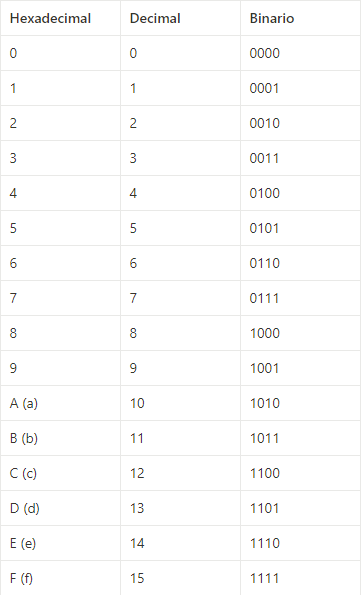
To convert hexadecimal numbers to binary, you can simply replace each hexadecimal digit with its 4-bit binary equivalent.
How to count in hexadecimal
When counting in hexadecimal, we follow a pattern similar to that used in the decimal system. We start with 0 and count upwards; once we reach the digit ‘9’, we move on to the letter ‘A’, which represents the value 10 in decimal, then we continue with ‘B’ (11), ‘C’ (12), ‘D’ (13), ‘E’ (14) and ‘F’ (15). Once we reach ‘F’, we move on to ’10’ (which represents 16 in decimal), and so the pattern continues.
Example of converting hexadecimal numbers to binary and decimal
For convert To convert a hexadecimal number to binary, we must replace each hexadecimal digit with its 4-bit binary equivalent. For example, the hexadecimal number ‘2A’ is converted to the binary number ‘00101010’.
For convert To convert a hexadecimal number to decimal, we multiply each hexadecimal digit by its position in base 16 and add the results together. For example, the hexadecimal number ‘2A’ is converted to decimal as follows: 2 * 16¹ + A * 16⁰ = 42.
Using hexadecimal notation for RGB colours
The hexadecimal system is also used to represent RGB colours and RGBA. In this case, we use two hexadecimal digits to represent the intensity of each of the colour channels: red (R), green (G) and blue (B). For example, the colour magenta is represented as ‘#FF00FF’, where ‘FF’ indicates the maximum intensity of red and blue, and ’00’ indicates the absence of green.
The use of hexadecimal in programming
The use of the hexadecimal system in programme It is handy, as most computers use the binary system to store and process data, and the conversion The conversion between hexadecimal and binary is straightforward and simple. The hexadecimal representations are used in the programming languages to specify numbers, characters, colours and memory addresses.
In short, the hexadecimal system is a versatile tool that facilitates the representation and manipulation of data in binary format, particularly in the context of computer science y programme. Its use in the digital world has proved to be an efficient and straightforward way of working with large amounts of information in a compact and comprehensible format.



 Español
  English (UK)