
Ethernet is a communication protocol for computer networks. It was originally developed by Xerox PARC in the 1970s and subsequently standardised by the Institute of Electrical and Electronics Engineers (IEEE) as IEEE 802.3.
Essentially, Ethernet defines the format of data and how it is transmitted over a network, which is why it is widely used to connect devices within a network.
What is Ethernet used for?
It serves several important purposes:
- Connectivity: It enables computers, printers, servers and other devices to communicate with one another within a local network.
- Data transfer: It facilitates the rapid exchange of information between connected devices.
- Internet access: It provides the infrastructure enabling devices on a local network to connect to the internet via a router.
- Standardisation: It uses common protocols and standards that ensure compatibility between devices from different manufacturers.
- Scalability: It allows you to easily expand your network by adding more devices.
- Speed: It offers high data transmission speeds, ranging from 10 Mbps in its earliest versions to 100 Gbps or more in the most recent versions.
How does Ethernet work?
Ethernet defines how devices communicate within a local area network (LAN). It works by transmitting data in packets via a shared medium, whether wired or wireless.
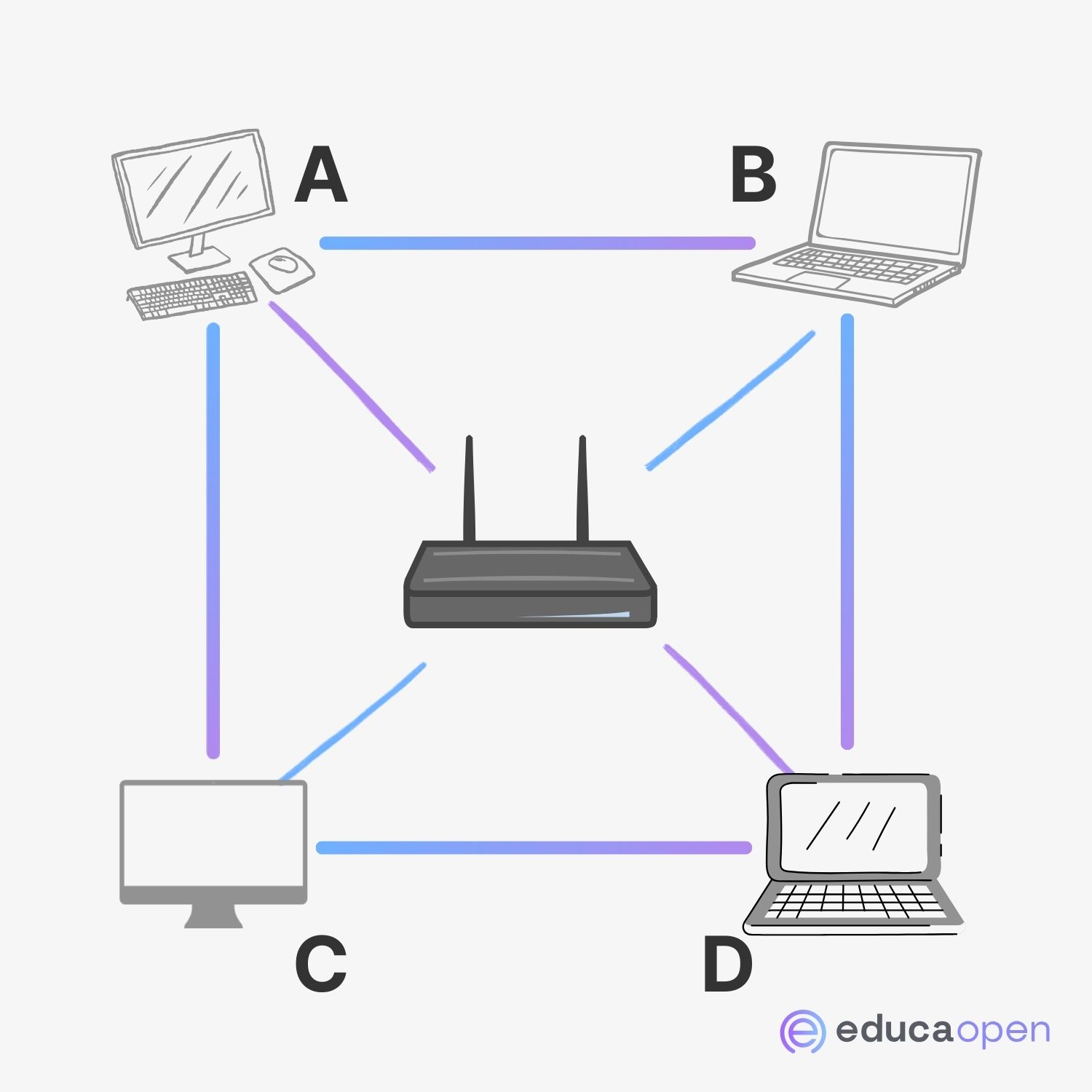
When a device wants to send data, First, check whether the network is free. If it is, it begins to transmit data. The data is divided into packets containing information about the source, the destination and the data itself. These packets travel across the network and are received by all devices, but only the correct recipient processes them.
Every device on an Ethernet network has a MAC address unique identifier.
Let’s suppose that computer C wants to send an email to computer D.
- C checks that the network is free.
- C begins transmitting, sending packets with D’s MAC address as the destination.
- The packets travel across the network and are detected by all the computers.
- A and B see the packets, but as they are not addressed to them, they ignore them.
- D recognises its MAC address in the packets and accepts them.
- D reassembles the packets to reconstruct the email.
- D sends a confirmation to C that it has received the data correctly.
Collision errors
Ethernet uses the method CSMA/CD (Multiple Access with Carrier Detection and Collision Detection) to manage traffic. If two devices transmit data at the same time, a collision occurs. The devices detect this, stop, wait for a random period of time, and then retry the data transmission.
Let’s imagine that computer A wants to send a file to computer C, and at the same time, computer B wants to send an email to computer D.
- A and B check whether the network is free and, seeing that it is, both start transmitting data at the same time.
- Data packets A and B collide on the network, causing an error.
- Both computers detect the collision and stop transmitting.
- A and B wait for a random length of time (for example, A waits for 3 milliseconds and B waits for 5 milliseconds).
- A, having waited for a shorter period, attempts to transmit the scheduled data again first. If the network is free, it completes its transmission.
- B, after waiting, checks that the network is busy, so waits for A to finish before attempting to communicate again.
The difference between Ethernet and the Internet
The Internet and Ethernet are concepts related to communication networks, but they operate at different levels and serve different purposes. The Internet is a global network that connects millions of smaller networks around the world.
Furthermore, Ethernet is a technology used to set up local area networks (LANs). Unlike the Internet, which is global and public, Ethernet focuses on connecting devices within a geographical area limited, such as an office or a home.



 Español
  English (UK)