
Organise styles into complex web projects It isn’t always straightforward. Style sheets tend to grow out of control and the code becomes difficult to maintain. This is where Sass, as a CSS preprocessor, makes a significant difference. It allows you to work in a structured, logical and reusable way. However, within Sass there are two main ways of writing code: SCSS and SASS. Choosing between the two can influence the development efficiency and clarity of the project. For this reason, understanding the differences between them is not only a technical issue but also a strategic one.
What is Sass?
Sass, or Syntactically Awesome Stylesheets, is a pre-processor that extends the CSS language with advanced features. It was created to make working with styles easier when CSS falls short: variables, functions, loops, mixins and nesting make it possible to write clean, scalable and more maintainable style sheets.
Within Sass There are two syntaxes for writing styles: indented syntax, known simply as Sass, and the syntax SCSS, which has a structure similar to that of traditional CSS. Sass’s syntax, which relies on indentation rather than curly brackets and semicolons, offers a cleaner and more concise format, although care must be taken to ensure correct indentation to avoid errors.
This approach is particularly useful when working in teams or managing multiple components with shared visual guidelines. Thanks to the use of Sass, changes are centralised, errors are reduced and productivity is improved. Its usefulness extends beyond the code: it enables the application of principles such as visual consistency, drawing on concepts such as Gestalt principles in the design, which contributes to a user experience (UX) more fluid.
Sass has been integrated into numerous modern development environments and is compatible with popular frameworks such as Bootstrap and Foundation. This widespread adoption has cemented its role as the standard for well-structured web projects.
What is SCSS?
SCSS It is one of the two syntaxes supported by Sass and the most common one today. Its main feature is that it retains the CSS structure and style traditional. It uses curly brackets to group rules and semicolons to separate lines, which means that any valid CSS file is also a valid SCSS file.
This has two key advantages: the the learning curve is shallower For those who are already familiar with CSS, the transition from existing projects is much quicker. As it does not require such an abrupt change in mindset, SCSS becomes a convenient option for developers who wish to enhance their CSS without completely changing the way they work.
What’s more, thanks to tools such as Dart Sass, Vite and Webpack, it’s very easy to automatically compile SCSS files into CSS. All it takes is a simple command in the terminal.
SCSS syntax is particularly useful when working with reusable components, a responsive design is required and the aim is to maintain a clear visual structure. By integrating seamlessly with the usual workflow, it improves team performance and reduces the technical complexity of the project.
How do Sass and SCSS differ?
Both syntaxes they use the same kernel and they offer exactly the same features. What changes is the way they are written. In other words, the differences are stylistic rather than functional.
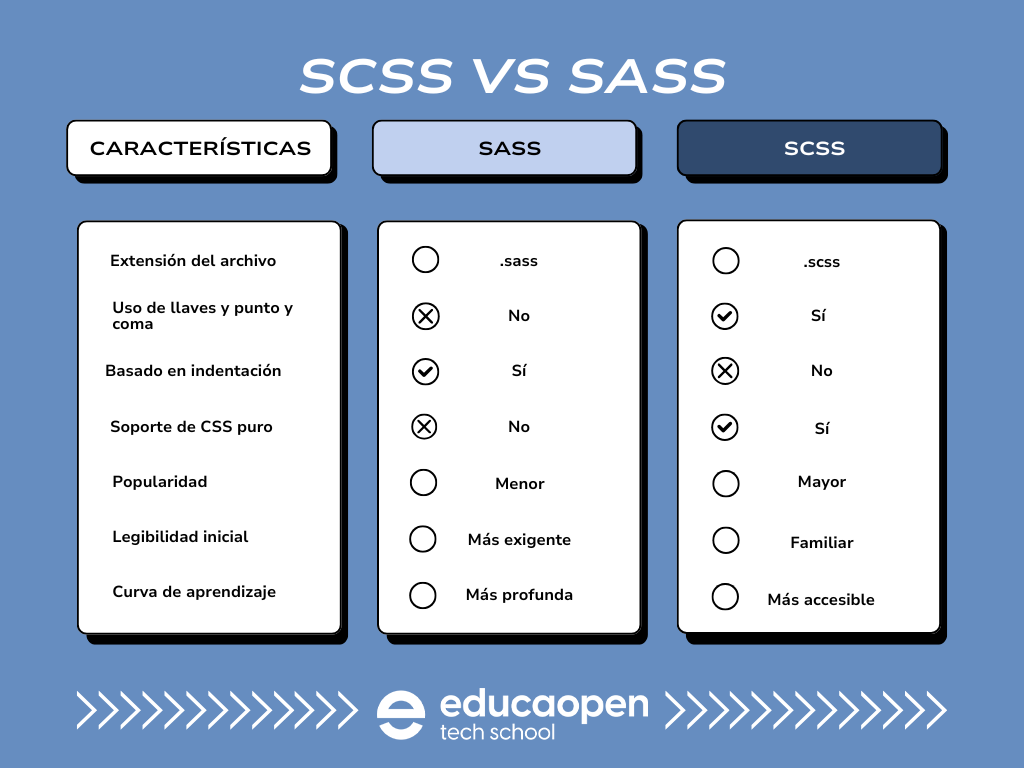
In Sass syntax, everything is based on the indentation. Whilst this can result in visually clean code, it can also lead to errors if the spacing is not followed precisely. SCSS, on the other hand, is more tolerant of structural variations, making it easier to read and maintain, particularly in large teams or when using shared stylesheets.
How can you use Sass and SCSS effectively?
To get the most out of Sass, whether using its original syntax or SCSS, you need to follow certain best practices. These recommendations help to keep your code clear, modular and efficient, particularly in medium- or large-scale projects.
Best practices for working with Sass or SCSS
- Divide the code into modules: Organise your styles into separate files by component, functionality or section. This improves maintainability.
- Use global variables: Define a colour palette, font sizes, margins and breakpoints. This way, all the adjustments are made in one place.
- Apply mixins and functions: Encapsulate repeating patterns and reuse them wherever necessary. Ideal for buttons, cards or layouts.
- Avoid excessive nesting: Although this is one of Sass’s advantages, overusing nesting can make the code difficult to read.
- Automate the conversation: Use modern tools to compile SCSS to CSS effortlessly and with error checking.
- Document the key passages: Although Sass is not a conventional programming language, adding comments to mixins, functions and variables helps to keep things organised.
Another strategy is to combine Sass with concepts such as Sass and SCSS Modular to clearly separate global styles from specific ones. This separation helps both to optimise performance and to create a more consistent user experience.


 Español
  English (UK)